Adding Standard.Site Support
How I added standard.site support to this lil ol blog
Related Listening
Posted on 2026-06-17
As a 38 year old Bluesky user and distributed systems nerd, I'm interested in AT Proto and I thought it'd be a fun lark to add Standard.Site support to my crappy little handmade blog engine. How hard could it be?? Let's find out... together!
Mat Marquis has a great series on how he implemented Standard.Site (we won't be abbreviating that) on his blog that I've used as a starting point. However, this is a static site, written in GLORIOUS ELIXIR therefore we must make a few detours.
I did use PDSls to create the publication record for my blog as Mat did and added the meta tag. Ezpz.
Next, I need to add support for creating the document records for each post. I'm choosing to use the Atex library, as it already supports the Standard lexicons via atex_standard_site. It's really nice to be able to add the dependency and then just start figuring things out in the REPL. I was able to pretty easily get logged in and get a working client:
iex(2)> Atex.XRPC.LoginClient.login("https://bsky.social", Application.get_env(:personal, :at_handle), Application.get_env(:personal, :app_password))
{:ok,
 %Atex.XRPC.LoginClient{
   endpoint: "https://bsky.social",
   access_token: "access token",
   refresh_token: "refresh token"
 }}
Of course, as I'm doing this, I realize it's no good to just be posting these off, a proper blog has things like OpenGraph images. I've been looking for an excuse to try Typst, and all the cool kids are using Typst to generate OpenGraph images, might as well see what it's all about! There are Elixir bindings to the Rust Typst library which provide a nice, ergonomic way for me to generate my images. I considered just shelling out to the binary, because I like this site to be as DIY as possible, but I'm not going to be a zealot about it.
I found the very cool conch Typst package on Typst Universe, and I would like to thank the author for their work. That said, the terminal styles that aren't Mac look... just OK. I made a few tweaks to better fit how I think my shell actually looks:
#import "@preview/conch:0.1.0": system, terminal

#let _win-btn(content, f, fg, bg: none) = box(
  fill: bg,
  width: 32pt,
  height: 22pt,
  align(center + horizon, text(..f, fill: fg, size: 14pt)[#content]),
)

#let _tab-close-btn(content, f, fg, bg: none) = box(
  fill: bg,
  height: 1pt,
  align(bottom, text(..f, fill: fg, size: 14pt)[#content]),
)

#show: terminal.with(
  system: system(
    hostname: "andyleclair.dev",
    files: (
      "announcement.txt": "
███╗   ██╗███████╗██╗    ██╗    ██████╗  ██████╗ ███████╗████████╗██╗
████╗  ██║██╔════╝██║    ██║    ██╔══██╗██╔═══██╗██╔════╝╚══██╔══╝██║
██╔██╗ ██║█████╗  ██║ █╗ ██║    ██████╔╝██║   ██║███████╗   ██║   ██║
██║╚██╗██║██╔══╝  ██║███╗██║    ██╔═══╝ ██║   ██║╚════██║   ██║   ╚═╝
██║ ╚████║███████╗╚███╔███╔╝    ██║     ╚██████╔╝███████║   ██║   ██╗
╚═╝  ╚═══╝╚══════╝ ╚══╝╚══╝     ╚═╝      ╚═════╝ ╚══════╝   ╚═╝   ╚═╝

A ~*fresh*~, new blog post at andyleclair.dev


",
    ),
  ),
  user: "andy",
  height: 630pt,
  width: 1200pt,
  font: (size: 24pt),
  chrome: (
    bar: (title, theme, font) => block(
      fill: theme.title-bg,
      width: 100%,
      {
        h(10pt)
        box(
          inset: (top: 4pt),
          {
            box(
              fill: theme.bg,
              radius: (top-left: 4pt, top-right: 4pt),
              inset: (x: 14pt, y: 8pt),
              {
                if title != "" {
                  text(..font, fill: theme.title-fg, size: 14pt)[#title]
                }
                h(10pt)
                _tab-close-btn([\u{2715}], font, white)
              },
            )
          }
        )
       h(1fr)
       box(
         baseline: -4pt,
         {
          _win-btn([\u{2500}], font, theme.title-fg)
          _win-btn([\u{2750}], font, theme.title-fg)
          _win-btn([\u{2715}], font, theme.title-fg)
         }
        )
      },
    ),
    radius: (top: 4pt, bottom: 4pt),
  ),
  theme: (
    bg: rgb("#000000"), fg: rgb("#FFFFFF"),
    prompt-user: rgb("#75507B"), prompt-path: rgb("#729FCF"), prompt-sym: rgb("#D3D7CF"),
    title-bg: rgb("#555753"), title-fg: rgb("#EEEEEC"),
    error: rgb("#CC0000"), cursor: rgb("#D3D7CF"),
    ansi: (
      red: rgb("#CC0000"), green: rgb("#4E9A06"), yellow: rgb("#C4A000"),
      blue: rgb("#3465A4"), magenta: rgb("#75507B"), cyan: rgb("#06989A"), white: rgb("#D3D7CF"),
      bright-red: rgb("#EF2929"), bright-green: rgb("#8AE234"), bright-yellow: rgb("#FCE94F"),
      bright-blue: rgb("#729FCF"), bright-magenta: rgb("#AD7FA8"), bright-cyan: rgb("#34E2E2"), bright-white: rgb("#EEEEEC"),
    ),
  )
)
Do not consider how much time I spent dickering to get that looking just right!!
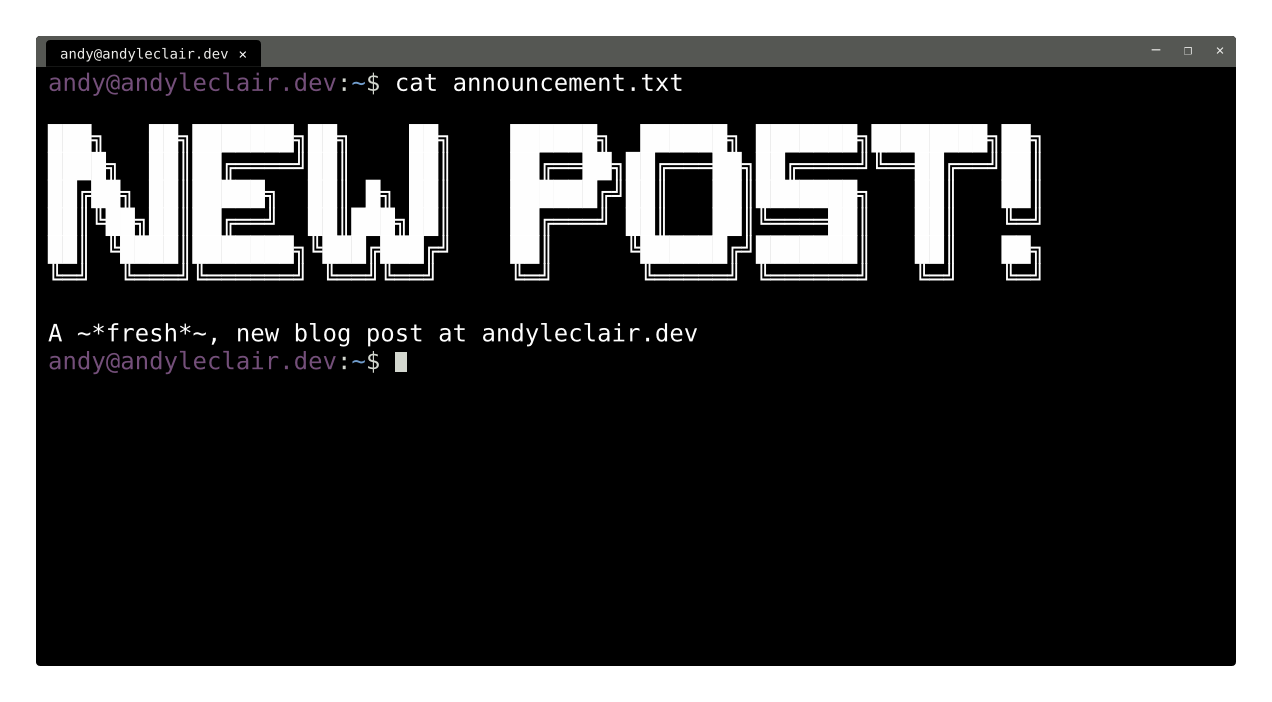
Sick! Ok, that looks decent, except for two small bits:
- We're not currently dynamically generating that ASCII text, that's hardcoded
- There's no customization per-post (or per-page!)
One foot in front of the other, let's dynamically generate that ASCII first before we dig into dynamically templating.
Figlet
Originally, I just went to this page to generate some ASCII text, but I'd really love it if I was able to dynamically generate the text myself. There exists a Hex package for Figlet (FIGfont being the ASCII art font specification), however, the way the code is set up, it doesn't actually ship any of the fonts, so, it's more or less useless as-is. I've forked the library and I've submitted a patch upstream so we can make it work.
Now that's done, we can get on to the important work:
iex(9)> Figlet.text("fart", font: "figlet.js/ANSI Shadow.flf")

███████╗ █████╗ ██████╗ ████████╗
██╔════╝██╔══██╗██╔══██╗╚══██╔══╝
█████╗  ███████║██████╔╝   ██║
██╔══╝  ██╔══██║██╔══██╗   ██║
██║     ██║  ██║██║  ██║   ██║
╚═╝     ╚═╝  ╚═╝╚═╝  ╚═╝   ╚═╝

:ok
Glorious.
Now, we just add EEX templates into the Typst template and a generator function for each post:
defmodule Personal.Opengraph do
  alias Personal.Post

  @post_template File.read!("typst/post.typ")
  @external_resource "typst/post.typ"

  def generate_image(%Post{title: title, description: description, path: path}) do
    ascii_big_text = Figlet.string("NEW POST!", font: "figlet.js/ANSI Shadow.flf")
    url = Personal.url(path)

    {:ok, png} =
      Typst.render_to_png(@post_template,
        ascii_big_text: ascii_big_text,
        title: title,
        description: description,
        url: url
      )

    og_path = Path.join([File.cwd!(), "assets", "images", "og"])

    Path.join(og_path, Path.dirname(path)) |> File.mkdir_p!()

    output_path = Path.join([og_path, Path.rootname(path)]) <> ".png"

    File.write!(output_path, png)

    output_path
  end
end
And just like that, we've got a directory full of OpenGraph images, generated from each post. Nice!!!
Now we can get on to finishing our Standard.Site integration
Finishing Standard.Site
I want to create a new standard.site.document every time I create a new blog post. Since we need an AT Proto client anyway, I figure I might as well handle publishing when I create a new post. I want to automate this process as much as possible. Why just leave a step around that I could forget to do when I could automate it instead?
It took me a while to figure out the right incantation to be able to read my data out of my AT Proto repo. I tried a few combinations of key pairs based on the docs, but what worked for me was using the atex_ lexicon structs. Atex is separated into a few repos, I needed these all to make this work:
  defp deps do
    [
      {:atex, git: "https://tangled.org/comet.sh/atex", override: true},
      {:atex_atproto, "~> 0.1"},
      {:atex_bsky, "~> 0.1"},
      {:atex_standard_site, "~> 0.1"},
    ]
  end
I also had to point at atex on Tangled, because the latest version on Hex as of writing (0.9.1) has a bug but it's fixed on main.
But once I had that set up, this just worked for me:
iex(1)> {:ok, client} = Atex.XRPC.LoginClient.login("https://bsky.social", Application.get_env(:personal, :at_handle), Application.get_env(:personal, :app_password))
{:ok,
 %Atex.XRPC.LoginClient{
   endpoint: "https://bsky.social",
   access_token: "eyJ...",
   refresh_token: "eyJ..."
 }}
iex(3)> Atex.XRPC.get(client, %Com.Atproto.Repo.ListRecords{params: %Com.Atproto.Repo.ListRecords.Params{repo: "did:plc:elpdw5nwg3yzxouqzzjqjg43", collection: "site.standard.publication"}})
{:ok,
 %Req.Response{
   status: 200,
   headers: %{
     "access-control-allow-origin" => ["*"],
     "connection" => ["keep-alive"],
     "content-length" => ["402"],
     "content-type" => ["application/json; charset=utf-8"],
     "date" => ["Tue, 16 Jun 2026 19:10:08 GMT"],
     "etag" => ["W/\"192-uyUICImPqjIq0uIJT0t4NrOZ3kY\""],
     "ratelimit-limit" => ["3000"],
     "ratelimit-policy" => ["3000;w=300"],
     "ratelimit-remaining" => ["2999"],
     "ratelimit-reset" => ["1781637308"],
     "vary" => ["Accept-Encoding"],
     "x-powered-by" => ["Express"]
   },
   body: %Com.Atproto.Repo.ListRecords.Output{
     cursor: "3mo5adp7hsq2f",
     records: [
       %{
         "cid" => "bafyreihv6vjng5dp3t2ijphrxowg2ep2zfrvrbfxrtdcsqud3iguvadw2y",
         "uri" => "at://did:plc:elpdw5nwg3yzxouqzzjqjg43/site.standard.publication/3mo5adp7hsq2f",
         "value" => %{
           "$type" => "site.standard.publication",
           "description" => "The personal blog of Andy LeClair, internet wizard",
           "name" => "andyleclair.dev",
           "preferences" => %{"showInDiscover" => true},
           "url" => "https://andyleclair.dev"
         }
       }
     ],
     "$type": "com.atproto.repo.listRecords#output"
   },
   trailers: %{},
   private: %{}
 },
 %Atex.XRPC.LoginClient{
   endpoint: "https://bsky.social",
   access_token: "eyJ...",
   refresh_token: "eyJ..."
 }}
With a little bit of extra code, we're basically done here!
defmodule Personal.StandardSite do
  alias Personal.Post
  alias Site.Standard.Document
  alias Atex.XRPC.LoginClient

  def publish_document(%LoginClient{} = client, %Post{} = post) do
    Atex.XRPC.post(client, %Com.Atproto.Repo.CreateRecord{
      input: %Com.Atproto.Repo.CreateRecord.Input{
        repo: did(),
        collection: "site.standard.document",
        rkey: Atex.TID.now() |> to_string(),
        record: document(post)
      }
    })
  end

  def document(%Post{
        tags: tags,
        title: title,
        path: path,
        description: description,
        date: date
      }) do
    published_at = date |> DateTime.new!(~T[04:20:00]) |> DateTime.to_iso8601()

    %Document{
      site: well_known(),
      title: title,
      description: description,
      path: path,
      publishedAt: published_at,
      tags: tags
    }
  end

  def well_known do
    Application.get_env(:personal, :well_known)
  end

  def did do
    Application.get_env(:personal, :did)
  end
end
Thanks for reading! I hope this inspires you to have some fun tinkering on your own website.
Acknowledgements
I'd like to thank the following pages, which served as inspiration for this work and this post: